PROFESSIONAL LIGHTING + VISUAL CONTROL
Live lighting control software for audio, automation and external control.
Build node-based shows that react to live audio DSP and beat signals, follow timecode or schedules, and accept control from MIDI, OSC, DMX or API/MCP — then send the result to fixtures, pixels, visuals and Web Control.
Free account required — no credit card — Windows, macOS and Linux.
- Windows
- macOS
- Linux
Art‑Net & sACN · Stage 3D · Web Control · packaged Cloud shows
DMX512 · ART-NET · sACN · OSC · MIDI · SMPTE/MTC
One graph. Whole show.
Lights, LED pixels, Stage 3D beams, Screen Out, timecode, and phone-side Web Control usually mean a pile of apps that do not share a clock.
WavePhase is one runtime and one .wphase package — audio analysis and the node graph drive DMX, visuals, and crew surfaces together, with optional Cloud sync and Wavy for pre-show patching.
How it works →Capabilities
The desk, in one workspace
Graph, analysis, Stage 3D, timecode, and phone-side control — one runtime, not a pile of apps that drift off the clock.
Live audio analysis
BPM and beat, key, spectrum bands, envelope/levels, transients, and custom frequency-range signals from the live feed.
Learn more →Stage 3D and fixture patch
Address Art-Net or sACN, place fixtures, and preview beams before you go live.
Learn more →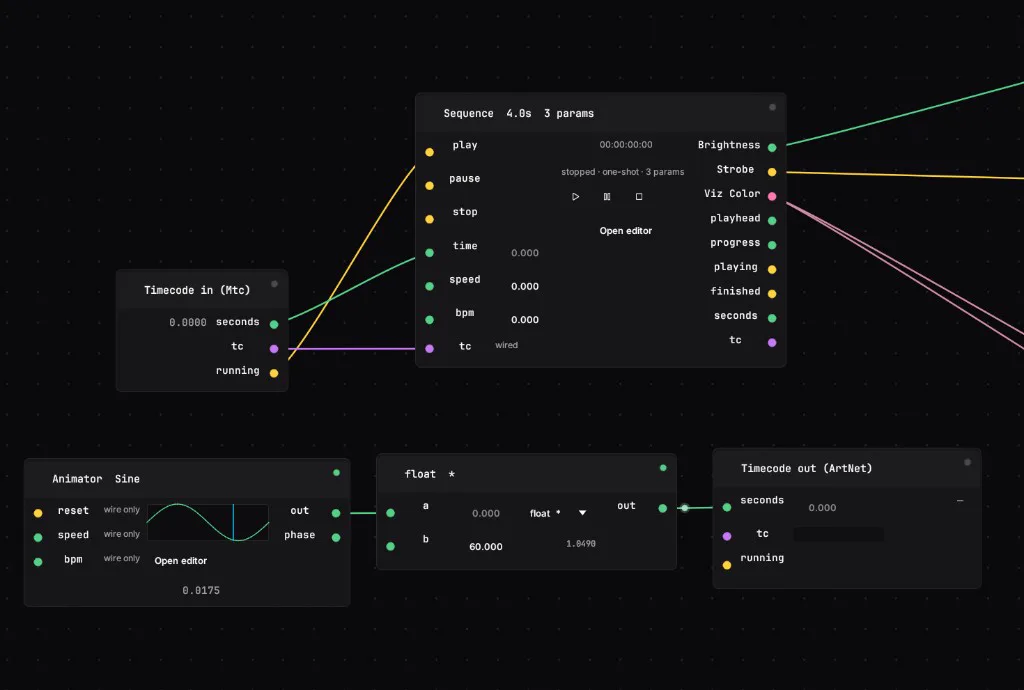
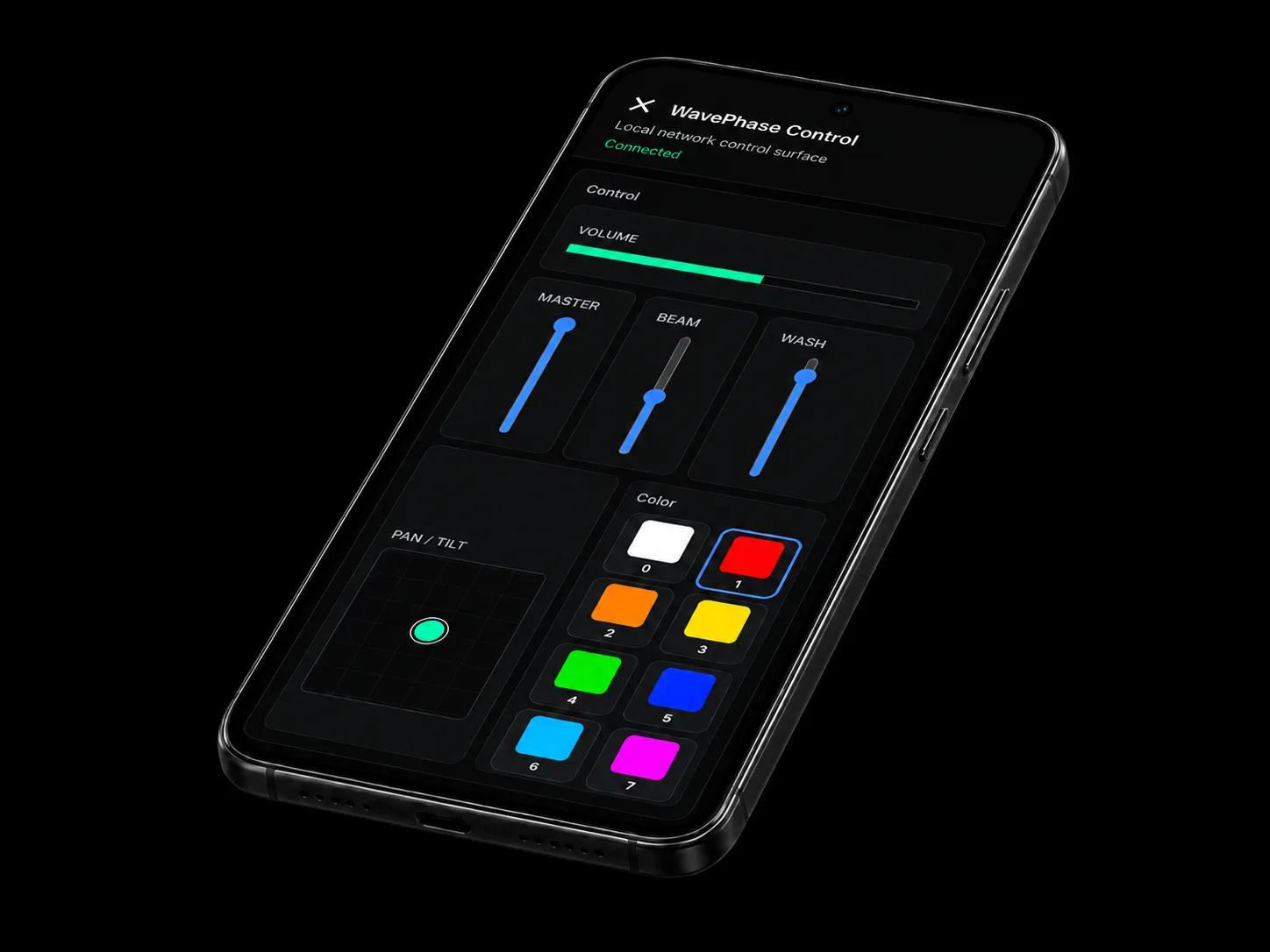
Web Control and Show Lock
Open a control surface on any phone on the LAN or Cloud. Lock the show with a PIN so a kiosk cannot change the patch.
Learn more →Who it is for
Same runtime, different rooms
DJs
Live mixer-feed lighting without pre-authoring every track.
Read more →
Clubs
Show Lock, schedules, reactive layer and phone control for nights without a dedicated LD.
Read more →
Venues & installations
Autostart, recovery, wired Art-Net/sACN and staff surfaces for permanent rigs.
Read more →
Stages & festivals
Timecode, desk merge, visuals and redundancy practices alongside a dedicated console.
Read more →
Built to hold through the show.
Recovery, lock-down installs, and careful show-file upgrades — so a working desk stays trustworthy when it matters.
Crash recovery
Autosave and session restore bring the show back after an unexpected exit.
Show lock
PIN-lock the UI for unattended installs — Live stays reachable; the patch stays protected.
Offline-first
No cloud dependency on stage — the desk runs when the network does not.
Show compatibility
Older .wphase packages open with a clear upgrade path — freeze a proven build before festival day.
Same six jobs. Different amount of your evening.
None of this is about having more features than the desk you already know. It is about where the work happens: live in the graph, in front of the rig, instead of offline in a prep session you have to redo when the room changes.
Wire a new source to a fixture
Rebuild the cue stack offline, reload the show, hope it reads how you pictured it
Drag a wire. It is driving the fixture on the next frame, mid-show.
Put visuals behind the lights
A second application, a second operator, and a sync that drifts across the set
Screen Out shares the same graph and the same clock as the rig.
Give the crew a control surface
Buy a second console, or accept that only the desk position can touch anything
Web Control serves your banks to any phone on the LAN. Show Lock guards them.
Start a look from nothing
A blank timeline and an hour of prep before the first beam moves
Describe it. WI scaffolds the patch, wires it, and explains what it built.
Move a show between machines
A USB stick, a version number in the filename, and crossed fingers
Cloud sync, versioned, with the fixture library travelling alongside it.
Run it on the venue's hardware
A licence dongle and a machine spec written a decade ago
Rust and WGPU — Windows, macOS, and Linux.
Pricing · Early access 0.9
Early Access — 40% off v1.0 pricing
Early Access pricing — 40% off v1.0.
Perpetual license — pay once. Every paid tier is 40% off the announced v1.0 buy price. Includes 24 months of updates; renewals afterward use the then-current yearly rate. Prices in EUR; VAT may apply at checkout.
What you get for buying in early access
- 40% off announced v1.0 buy pricing on every paid tier
- 24 months of updates included with Early Access purchases
- After that, renew updates yearly at the then-current rate (we'll notify before changes)
One runtime for lights, LED, screens, and crew control — designed to sit alongside your existing show stack, not replace a dedicated console.
Free
€0
forever free · commercial OK during EA
Learn, hobby, and try real shows. Commercial use allowed during early access.
- 1
- MIDI only
- —
- Community
Artist
€119
€19940% off
early access · one-time · rises to €199 at v1.0
Mobile DJs, small clubs, and single-room setups.
- 4
- Yes
- 1
- Community
Pro
€299
€49940% off
early access · one-time · rises to €499 at v1.0
Clubs, stage, and paid productions with an operator at the machine.
- 16
- Yes
- 2
Studio
€659
€1,09940% off
early access · one-time · rises to €1,099 at v1.0
Touring, large stages, and rental houses.
- Unlimited
- Yes
- 3
- Priority
Every plan includes
- Visual node editor (100+ building blocks)
- GPU visual engine & LED pixel mapping
- Real-time BPM/beat, key and audio DSP analysis
- DMX out via Art-Net & sACN
- MIDI in & OSC output
- Runs on Windows, macOS & Linux
Optional — add to any tier, including Free.
WavePhase Cloud
€17
€2940% off
/ seat / month · or €174/year €290 v1.0 · 40% off
Wavy included · 250 credits/month (about 60 patches / month) · no API key
- Wavy (WI) — no API key or model selection
- Packaged Cloud show sync with Version History (media included)
- 10 GB included show storage · extra GB available as an add-on
- Internet Web Control relay with password, roles, expiry, and link rotation
- Cross-device open of packaged shows without separate media transfer
- Team-ready project history with author attribution
5-credit trial — no card
Teams: 1–50 seats, adjustable anytime
Start free trialDownload the Free tier (commercial OK during early access)
Early Access software — test and supervise every live show. See Early Access terms. Early Access terms. Full plan comparison.
FAQ
Straight answers before you download
What WavePhase does, what it connects to, and what you get on the free plan — without the marketing gloss.
Turn the sound on.
Free account required — no credit card — Windows, macOS and Linux.
- Windows
- macOS
- Linux